How Do I Forward SMS Received on a Virtual Phone Number to Another Phone?
AutoForwardText can automatically forward incoming SMS received on your Virtual Phone Number to one or more regular mobile phone numbers.
This is useful when several employees, administrators, or team members need to receive the same incoming alert without signing in to the AutoForwardText dashboard.
You can forward messages to up to 10 US or Canadian phone numbers.
How Virtual Number SMS Forwarding Works
Customer or system sends SMS
to your AutoForwardText Virtual Number
                ↓
AutoForwardText receives the message
                ↓
The message is stored in your AFT inbox
                ↓
AutoForwardText sends a copy through
an AFT-managed shared outgoing number
                ↓
SMS delivered to:

✓ Staff member 1
✓ Staff member 2
✓ Alarm administrator
✓ On-call employee
✓ Other configured recipients
The recipient receives a standard SMS and does not need to install the AutoForwardText app.
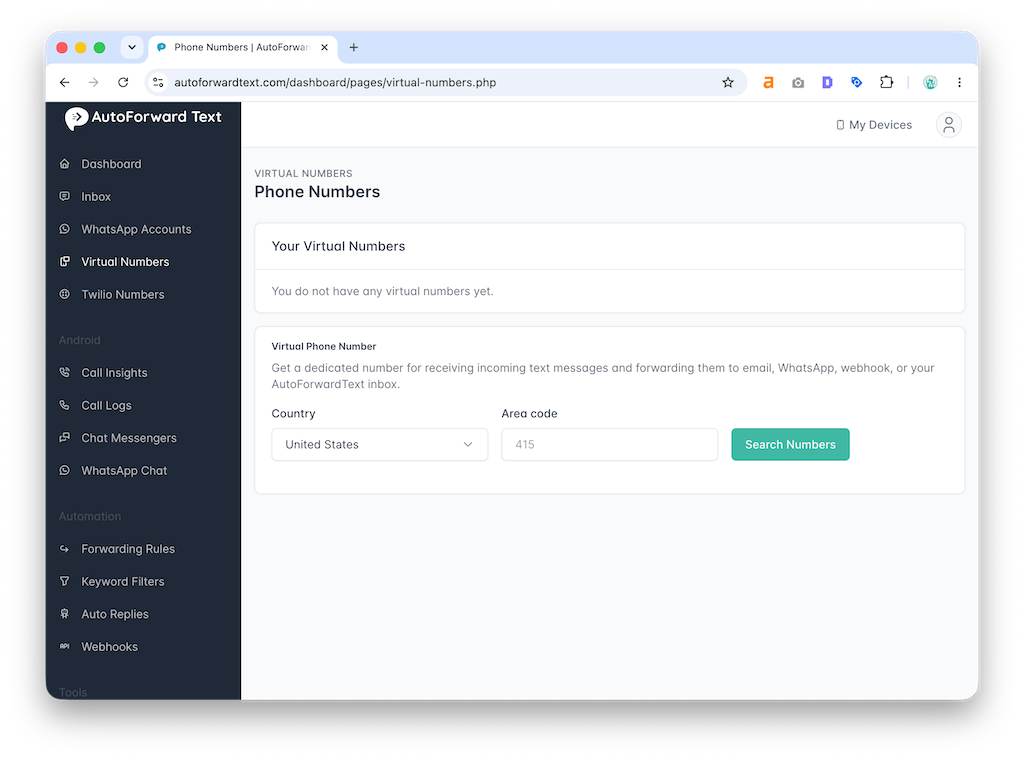
Step 1: Obtain an AutoForwardText Virtual Number
First, add a Virtual Phone Number from your AutoForwardText dashboard.
This number receives incoming SMS independently of your Android or iPhone.
Open:
Virtual Phone Numbers
Select the country and area code, search for an available number, and complete the number setup.
Step 2: Open the Forwarding Settings
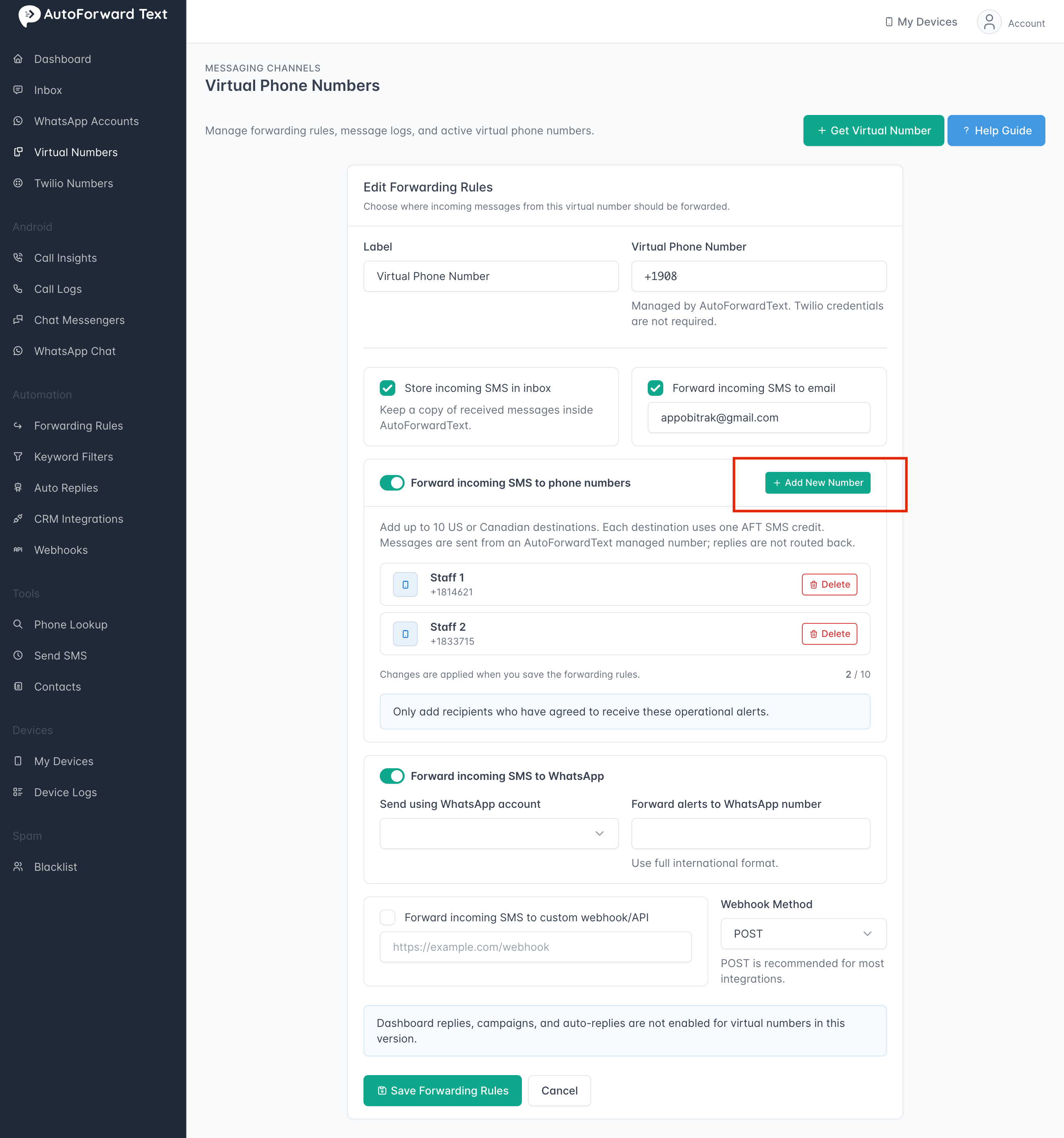
From your AutoForwardText dashboard:
-
Open Virtual Phone Numbers
-
Find the number you want to configure
-
Click Manage Forwarding
-
Locate Forward incoming SMS to phone numbers
Turn on the forwarding option.
Step 3: Add a Phone Destination
Click:
Add New Number
A window will appear asking for:
-
Label: An optional name such as “Staff 1,” “Alarm Admin,” or “On-Call Manager”
-
Phone number: The US or Canadian number that should receive forwarded messages
Enter the phone number using international format:
+14155552671
Ten-digit US and Canadian numbers are automatically converted to +1 format.
Click:
Add Number
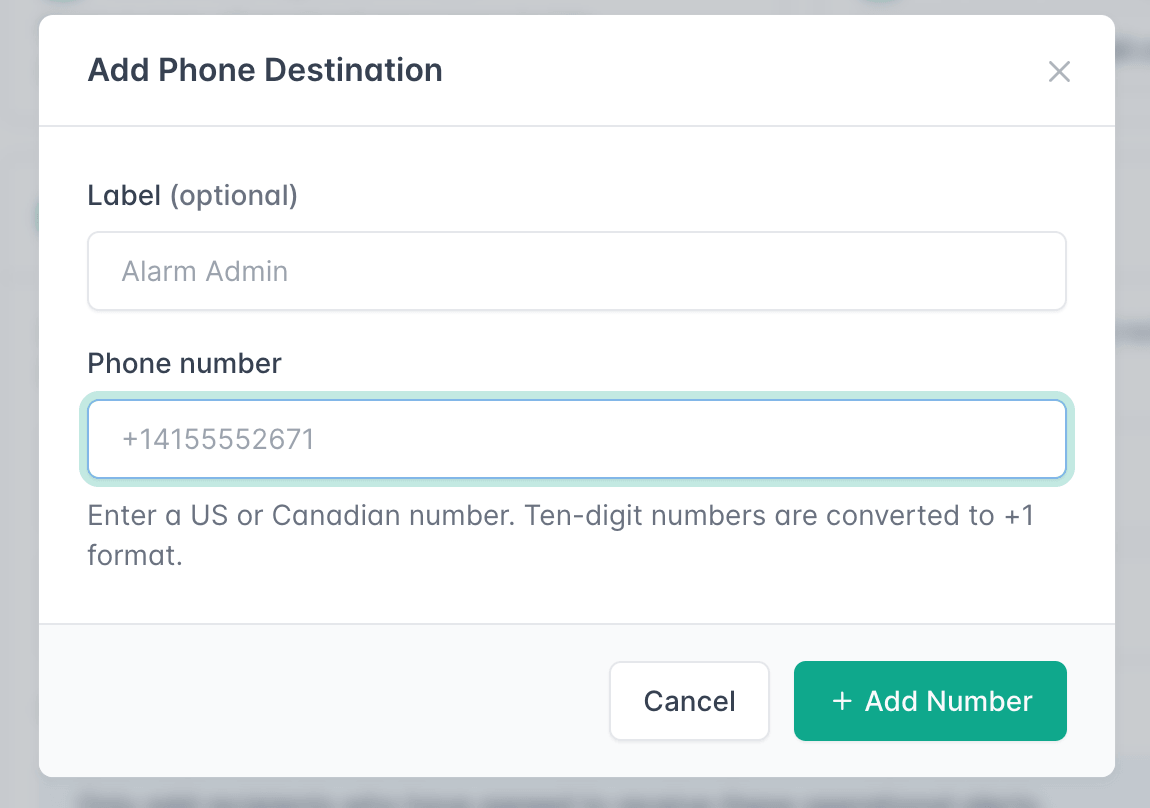
The destination will appear in your phone forwarding list.
Repeat this process to add additional recipients. You can configure up to 10 phone destinations.
Step 4: Save the Forwarding Rules
After adding or removing destinations, click:
Save Forwarding Rules
Changes do not take effect until the forwarding rules are saved.
Once saved, new SMS received on the Virtual Phone Number will automatically be forwarded to every active phone destination.
Step 5: Send a Test Message
Send an SMS from another phone to your AutoForwardText Virtual Number.
Do not send the test directly to the destination number.
Within a short time, each configured destination should receive a message similar to:
[AFT] From +18882918794: The alarm was triggered accidentally. Please disregard. | Received on +12025550123
The forwarded message identifies:
-
The original sender
-
The original message
-
The AutoForwardText Virtual Number that received it
This is especially helpful when the same person receives alerts from multiple virtual numbers.
How Do I Remove a Destination?
Open the Virtual Phone Number’s forwarding settings and locate the destination.
Click:
Delete
The destination will be removed from the list.
Click Save Forwarding Rules to apply the change.
If you remove the final phone destination, phone forwarding will automatically be disabled.
What Number Sends the Forwarded SMS?
Forwarded messages are sent using an AutoForwardText-managed shared outgoing number.
The recipient will therefore see the AFT-managed sender number rather than your Virtual Phone Number or the original sender’s number.
The original sender and receiving Virtual Number are included within the forwarded message.
Can Recipients Reply to the Forwarded SMS?
Not currently.
Replies sent to the AFT-managed shared outgoing number are not routed back to the original sender.
Recipients should use the original sender number shown inside the forwarded message if they need to respond directly.
How Many Destinations Can I Add?
You can add up to 10 US or Canadian phone destinations to each Virtual Phone Number.
Every incoming SMS is copied separately to each active destination.
For example:
1 incoming SMS forwarded to 1 destination
= 1 outgoing SMS

1 incoming SMS forwarded to 5 destinations
= 5 outgoing SMS messages
Each destination uses one AFT SMS credit for each forwarded message.
Do I Need to Configure Carrier SMS Forwarding?
No.
Virtual Number SMS forwarding does not require a change with your mobile carrier.
The sender must send the original SMS directly to your AutoForwardText Virtual Phone Number. AutoForwardText then distributes the message to your configured destinations.
This is different from Voicemail to Email, which may require carrier-level no-answer call forwarding.
Can I Forward SMS Received on My Existing Mobile Number?
This specific feature forwards SMS received by an AutoForwardText Virtual Phone Number.
To forward SMS received on an existing Android phone and SIM card, install the AutoForwardText Android app and configure phone forwarding from your Android connection.
Your Android phone must remain powered on and connected for messages received on its SIM card to be forwarded.
Do Destination Phones Need AutoForwardText?
No.
Destination phones receive ordinary SMS messages. They do not need:
-
The AutoForwardText app
-
An AutoForwardText account
-
Internet access
-
Access to your dashboard
They only need an active mobile number capable of receiving SMS.
Common Uses
Virtual Number SMS forwarding is useful for:
-
Burglar and security alarm notifications
-
On-call staff alerts
-
Property management teams
-
Contractors and field service businesses
-
Sales enquiry distribution
-
Appointment notifications
-
Shared support numbers
-
Emergency operational messages
-
Small businesses with multiple administrators
For example, if an employee accidentally triggers an office alarm, they can text the company’s Virtual Phone Number. AutoForwardText can immediately distribute that message to all configured alarm administrators.
Important
Phone forwarding uses AutoForwardText SMS credits.
Make sure your account has enough credits for the number of destinations you configure. If the account runs out of SMS credits, new phone forwarding deliveries may be skipped.
Forwarded SMS messages are intended for operational and transactional notifications. Only add recipients who have agreed to receive these alerts.
Still need help? Contact support.